
Last Updated on 17 July, 2025
Ever feel like your product photos get lost in the scroll? You’re not alone. In a sea of content, every detail of your visuals has to work overtime — especially the background. Enter Pippit, a powerful transparent background maker: your secret to breathing new life into static product shots, one cutout at a time.
Whether you’re a solo seller on Etsy, a big-league brand with multiple drops, or a designer making social ads, transparent backgrounds give you the flexibility to match every post, story, or ad to its platform. And if you’re already experimenting with tools like Pippit to bring your videos to life, adding crisp, backdrop-free images will push your content game to the next level.
Today, let’s peel back the layers on why removing your background isn’t just nice to have — it’s an e-commerce must!
Why plain product shots don’t always cut it
Let’s face it: not every photo you take is going to look amazing on every feed. Maybe you spent hours getting the lighting right, but that bedroom wall in the back just screams “last season.” Or perhaps you’re using manufacturer images that look generic, flat, and painfully unbranded.
Here’s the problem — shoppers notice. Background clutter can overshadow the product itself, distract the eye, and make your brand feel inconsistent across platforms. Imagine posting the same photo on your website, Instagram Stories, and a seasonal email banner — does it feel cohesive? Probably not.
Transparent backgrounds solve this in one quick swipe. By stripping away the noise, you keep the focus exactly where it should be: your product.
The brand vibe you want, on every single platform
It’s not just about removing what you don’t want — it’s about adding in what you do. Transparent backgrounds unlock a new level of flexibility. Swap in a sun-drenched beach scene for your summer line’s Instagram grid. Drop that same pair of sunglasses onto a neon pattern for your TikTok ad. Or use a clean white backdrop for your Shopify store.
One photo. Infinite vibes. Zero reshoots.
From flat to fresh: How background removal upgrades your visuals
Still wondering if it’s worth the extra step? Let’s break it down with a few brand-friendly perks:
- Seasonal refresh on demand: Instead of reshooting your entire catalog, reuse last year’s photos with new, on-brand backgrounds.
- On-brand consistency: Whether you sell jewelry, skincare, or tech accessories, your feed will always look polished and intentional.
- Dynamic content for ads: Product cutouts let you create scroll-stopping motion graphics or layered collages.
- Better integration with AI tools: If you’re using an AI voice generator for video ads, you can sync crisp cutout images with voiceovers to create professional reels or stories that don’t look like stale slideshows.
Get to know your transparent background maker: Meet Pippit
Good news — you don’t need Photoshop skills to nail this. Pippit’s transparent background maker in Image Studio does heavy lifting. It uses smart AI to detect the product in seconds, so you don’t waste time manually tracing edges.
If you’ve ever thought, “But I’m not a designer!” — that excuse just expired. Let’s see exactly how you can do it yourself in three easy steps.
Transition from cluttered to clear: Time to get started
Before we get to the steps, here’s a tip: while you’re experimenting with visuals, why not test out audio too? If you’re creating product videos or reels, you can layer your new clean visuals with crisp narration using an AI, perfect for giving your brand a human touch without booking a studio.
Ready? Here’s your no-stress, no-excuses workflow for stunning cutout images.
Step 1: Upload the picture
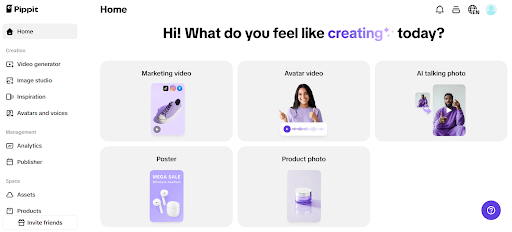
First things first, head over to Pippit and click “Sign Up” to make your free account. Once you’re in, navigate to Image Studio on the left-hand panel. You’ll see “Remove Background” under the Quick Tools section. Click it, then select where you want to upload your photo from — whether it’s your device, assets library, or a product folder. Drag and drop, and watch the magic begin.
Step 2: Make the photo background transparent
In a flash, Pippit’s AI will detect the product and strip out the background for you — no more jagged edges or weird shadows. Click the canvas and select “Background color” to pick a transparent backdrop that keeps all eyes on the product.
Want to go the extra mile? Click “Add Text” to overlay key features, slogans, or fun copy right on the image. Or switch to “Sales Poster” and type a quick prompt like “50% off summer sandals” — Pippit will whip up a polished sales poster for you, no design headaches.
Step 3: Export the picture with transparent background
Happy with the result? Click “Download” in the top-right corner. Be sure to choose PNG as your file format — this keeps the background clear so you can drop the image onto any new scene later. And don’t forget to select “No Watermark” if you want it extra clean.
Now you have a product shot that works anywhere — your website, ads, influencer collabs, you name it.
Smart ways to style your cutouts for maximum engagement
Now that you have your crisp cutout, what do you do with it? Here’s a swipe file of ideas to help you flex your new transparent masterpiece:
- Seasonal social posts: Add your product to different holiday or seasonal scenes to stay relevant year-round.
- Branded collages: Layer your cutouts over customer UGC for a fresh, community-focused vibe.
- Product highlight reels: Drop them into video carousels with an AI voiceover explaining features.
- Email banners: Use your transparent images in email headers for a sleek, uncluttered look.
- Stickers and GIFs: Save your cutouts as stickers to create shareable, branded memes or replies.
Keep your content fresh, flexible, and on-brand with Pippit
When you combine Pippit’s transparent background maker with tools like an AI voice generator, you unlock a creative playground that’s perfect for ecommerce brands, influencers, and creators alike. No more paying for endless reshoots or wasting time on tedious edits.
So, next time your feed starts feeling stale, don’t stress — cut it out and style it up instead.
Ready to make your product photos pop? Try Pippit today and give your content the polished, on-brand look your followers (and your sales!) will love.
Sign up for Pippit now and see how simple it is to create, customize, and share cutout images that stop the scroll!

Leave a Reply