
Last Updated on 24 February, 2024
 Photo: Gamer Robot Inc
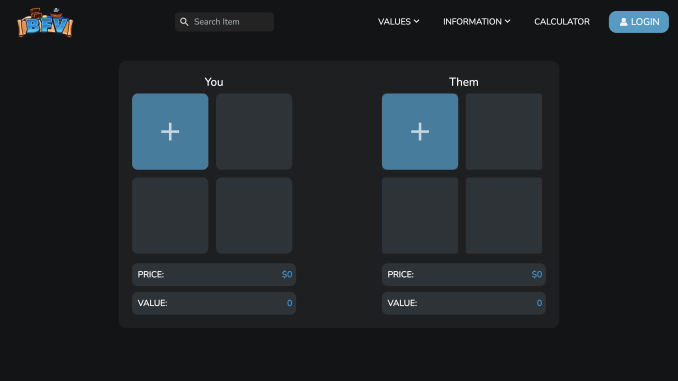
All the information you need to know about Blox Fruits Trade Calculator – Roblox Game by Gamer Robot Inc – Discover how to use, and what are the rules of Trading Calculator.
What Is Blox Fruits Trade Calculator?
Blox Fruits Trade Calculator is a web tool designed to help Roblox players calculate the value of their inventory and specific Blox Fruits. This significantly helps newbies and seasoned players to make informed decisions when trading their in-game items.
These are the main features of the web Trading Calculator:
- Community-driven: while calculating the value, the Trading Calculator considers both the value and demand for the item in question. This can further inform a player’s decision-making.
- Estimates item value: The calculator uses data and algorithms to estimate the current value of various Blox Fruits items and game passes
- Social media channels: Join the trading calculator social media channels to chat with other players, trade, and play Blox Fruits together
- Live Blox Fruits shop: check out which Blox Fruits are in stock without launching Roblox Blox Fruits
Blox Fruits Trade Calculator: Value and Demand Explained
Value is the most important parameter in the Blox Fruits calculator. It’s the amount players are ready to pay for a game pass or fruit in Trade. There are two main types of values: Regular and Permanent. When trading, it’s extremely important to carefully review both values of offered items.
Demand shows the player’s interest in the specific item rated on a scale of 1 to 10. Here’s what each demand value means in the Blox Fruits trade calculator:
- 1 to 4: low demand
- 5 to 7: moderate demand
- 8 to 10: high demand
Blox Fruits Trade Calculator: Fruit Status Explained
At the top of every Blox Fruit item, you’ll be able to find the colored Fruit Status. This system serves as a help to determine if an item is stable, unstable, overpriced, or undervalued.
- Stable (Green): The value is stable and won’t likely be changed anytime soon.
- Unstable (Orange): The value of the item isn’t stable and may decrease soon.
- Fluctuating (Blue): These are high-risk items with unstable prices. Usually, players buy these items for less than the listed value.
- Underpaid (Red): Red color means it’s impossible to trade the Blox Fruit for the listed value.
- Overpaid (Yellow): These items are fire! They can easily be traded for more than the listed value.
- Hyped Sticker (Pink): These are overpaid items, usually because of upcoming updates or events.
More Roblox Guides – Blox Fruits
If you like Blox Fruits and want to read more guides about this Roblox experience, check out our best pieces about Blox Fruits:
- Blox Fruits Valentines Update Guide
- How to get Shark Anchor in Blox Fruits
- Blox Fruits Abyss Tamer Title Guide
And if you are looking for Roblox codes, find them here. Our category collects more than 300 valid code lists for different Roblox experiences. We also recommend adding our website to your favorite webs (clicking Ctrl + D).
Leave a Reply